<!DOCTYPE html>
    <html lang="en" xmlns="http://www.w3.org/1999/xhtml" prefix="og: http://ogp.me/ns#">
    <head>
<title>Instructions for posting the Contractor Selection Plan - News - DauThau.Net</title>
<meta name="description" content="Instructions for posting the Contractor Selection Plan - Savefile - News -...">
<meta name="author" content="DauThau.Net - The first private bidding network in Vietnam">
<meta name="copyright" content="DauThau.Net - The first private bidding network in Vietnam [info@dauthau.net]">
<meta name="apple-mobile-web-app-capable" content="yes">
<meta name="generator" content="NukeViet v5.0">
<meta name="viewport" content="width=device-width, initial-scale=1">
<meta http-equiv="Content-Type" content="text/html; charset=utf-8">
<meta property="og:title" content="Instructions for posting the Contractor Selection Plan">
<meta property="og:type" content="website">
<meta property="og:description" content="Savefile - News - https&#x3A;&#x002F;&#x002F;dauthau.net&#x002F;en&#x002F;news&#x002F;savefile&#x002F;guides&#x002F;instructions-for-posting-the-contractor-selection-plan-31.html">
<meta property="og:site_name" content="DauThau.Net - The first private bidding network in Vietnam">
<meta property="og:url" content="https://dauthau.net/en/news/savefile/guides/instructions-for-posting-the-contractor-selection-plan-31.html">
<meta property="og:locale" content="en_US">
<meta property="fb:app_id" content="381865416432774">
<meta property="fb:pages" content="108252627774399">
<meta property="fb:admins" content="100001604800244">
<link rel="shortcut icon" href="https://dauthau.net/uploads/dauthau.net-ico-01.ico">
<link rel="canonical" href="https://dauthau.net/en/news/savefile/guides/instructions-for-posting-the-contractor-selection-plan-31.html">
<link rel="alternate" href="https://dauthau.net/en/news/rss/" title="News" type="application/rss+xml">
<link rel="alternate" href="https://dauthau.net/en/news/rss/notification/" title="News - Notification" type="application/rss+xml">
<link rel="alternate" href="https://dauthau.net/en/news/rss/hot-news/" title="News - Hot News" type="application/rss+xml">
<link rel="alternate" href="https://dauthau.net/en/news/rss/bid-solicitors/" title="News - Bid solicitors" type="application/rss+xml">
<link rel="alternate" href="https://dauthau.net/en/news/rss/contractors/" title="News - Contractors" type="application/rss+xml">
<link rel="alternate" href="https://dauthau.net/en/news/rss/business-news/" title="News - Business news" type="application/rss+xml">
<link rel="alternate" href="https://dauthau.net/en/news/rss/guides/" title="News - Guides" type="application/rss+xml">
<link rel="alternate" href="https://dauthau.net/en/news/rss/blog/" title="News - Blog" type="application/rss+xml">
<link rel="manifest" href="https://dauthau.net/manifest.webmanifest">
<link rel="stylesheet" href="/assets/css/core.r.min.css?t=1790159315">
<link rel="stylesheet" href="https://dauthau.net/themes/dauthau/css/dauthau.responsive.css">
<link rel="stylesheet" href="https://dauthau.net/themes/dauthau/css/news.css">
<link rel="stylesheet" href="https://dauthau.net/assets/js/perfect-scrollbar/style.css">
<style type="text/css">
	body{background: #fff;}
</style>
                <!-- Google Tag Manager -->
        <script>(function(w,d,s,l,i){w[l]=w[l]||[];w[l].push({'gtm.start':
        new Date().getTime(),event:'gtm.js'});var f=d.getElementsByTagName(s)[0],
        j=d.createElement(s),dl=l!='dataLayer'?'&l='+l:'';j.async=true;j.src=
        'https://www.googletagmanager.com/gtm.js?id='+i+dl;f.parentNode.insertBefore(j,f);
        })(window,document,'script','dataLayer','GTM-PTDVGWXN');</script>
        <!-- End Google Tag Manager -->
</head>
    <body>
<div id="print">
	<div id="hd_print">
		<h2 class="pull-left">DauThau.Net - The first private bidding network in Vietnam</h2>
		<p class="pull-right"><a title="DauThau.Net - The first private bidding network in Vietnam" href="https://dauthau.net/">https://dauthau.net</a></p>
	</div>
	<div class="clear"></div>
	<hr />
	<div id="content">
		<h1>Instructions for posting the Contractor Selection Plan</h1>
		<ul class="list-inline">
			<li>Saturday, 21 October 2023 11:36 AM</li>
			<li class="hidden-print txtrequired"><em class="fa fa-print">&nbsp;</em><a title="Print" href="https://dauthau.net/#" data-toggle="winCMD" data-cmd="print">Print</a></li>
			<li class="hidden-print txtrequired"><em class="fa fa-power-off">&nbsp;</em><a title="Close page" href="https://dauthau.net/#" data-toggle="winCMD" data-cmd="close">Close page</a></li>
		</ul>
		<div class="clear"></div>
		<div id="hometext">
			The following article will guide you in posting the Contractor Selection Plan during the operation process on the private bidding network DauThau.Net.

		</div>
				<div class="imghome">
			<img alt="Instructions for posting the Contractor Selection Plan" src="https://dauthau.net/uploads/news/2023_10/instructions-for-posting-the-contractor-selection-plan_1.jpg" width="460" class="img-thumbnail" />
		</div>
		<div class="clear"></div>
		<div id="bodytext" class="clearfix">
			<p><em>Nhấn&nbsp;<a href="https://dauthau.net/vi/news/huong-dan/huong-dan-dang-tai-ke-hoach-lua-chon-nha-thau-khlcnt-25.html" target="_blank"><strong>VÀO ĐÂY</strong></a>&nbsp;để chuyển bài viết sang bản tin tiếng Việt</em></p>
<h2>1. Why must the Contractor Selection Plan be posted?</h2>
After identifying the project, in order to have an implementation plan through dividing work parts, progress and other requirements to prepare for posting and bidding notices, the step to create a Selection Plan is to create a selection plan. Contractor and posting are necessary intermediate steps that must be taken.
<h2>2. Post the contractor selection plan</h2>
<ul>
	<li><u><strong>Step 1</strong></u>: Access to upload the <strong>Contractor Selection Plan</strong></li>
</ul>
To be able to manage the Notice of Invitation to Bid, the system allows you to access the management page in one of three ways:<br />
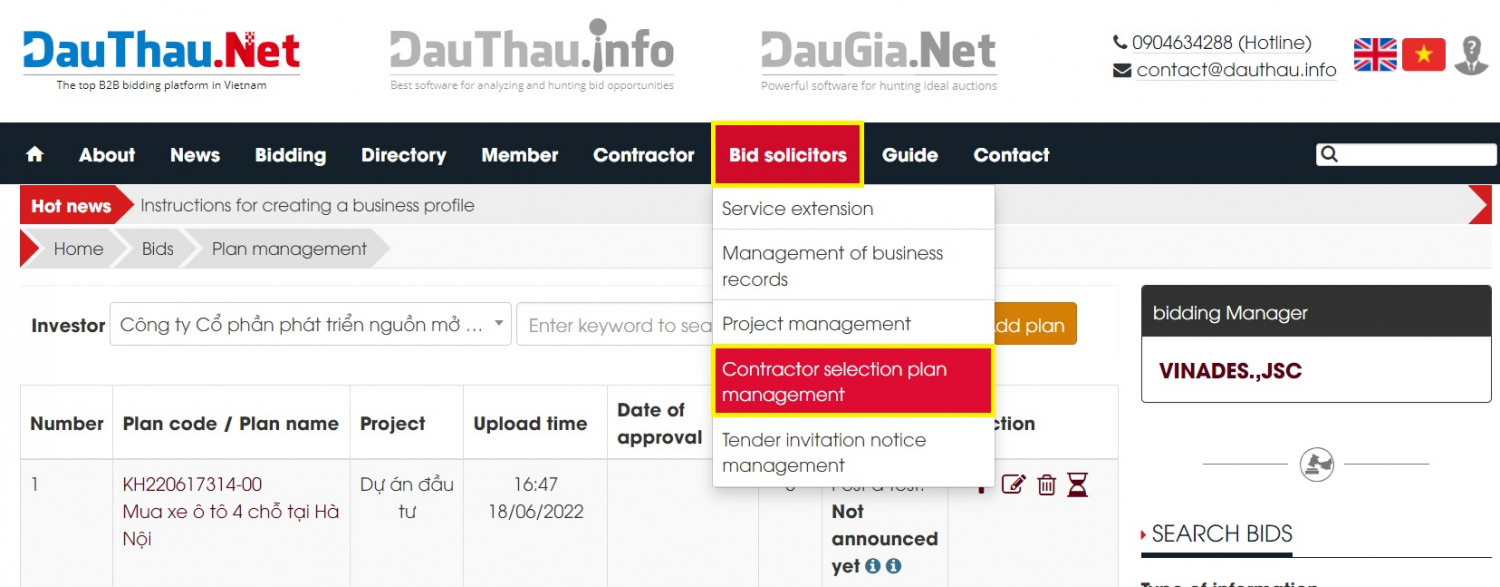
<u><strong>Method 1</strong></u>: From the menu <strong>Bid Soclicitors</strong>&nbsp;=&gt; <strong>Contractor Selection Plan management&nbsp;</strong>(See <em>Picture 1.1</em>)
<div style="text-align:center">
<div class="image-center">
<figure class="image"><img alt="Picture 1 1 Create a Contractor Selection Plan from the Procuring Entity menu" height="313" src="https://dauthau.net/uploads/news/2023_10/picture-1.1create-a-contractor-selection-plan-from-the-procuring-entity-menu.jpg" width="800" />
<figcaption><em>Picture 1.1. Create a Contractor Selection Plan from the Procuring Entity menu</em></figcaption>
</figure>
</div>
</div>
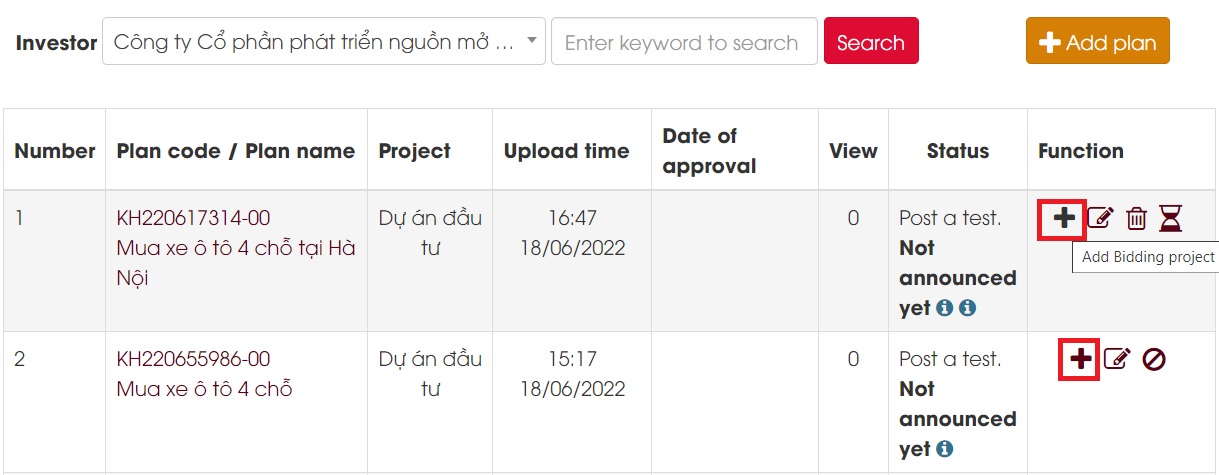
<u><strong>Method 2</strong></u>: From Project Management section &gt; Add contractor selection plan function button (See Picture 1.2)
<div class="image-center">
<figure class="image"><img alt="Picture 1 2 Create a Contractor Selection Plan from the posted Project" height="312" src="https://dauthau.net/uploads/news/2023_10/picture-1.2create-a-contractor-selection-plan-from-the-posted-project.jpg" width="800" />
<figcaption><em>Picture 1.2. Create a Contractor Selection Plan from the posted Project</em></figcaption>
</figure>
</div>
<ul>
	<li><u><strong>Step 2</strong></u>: Declare the <strong>Contractor Selection Plan</strong>.</li>
</ul>
After choosing to initiate the Contractor Selection Plan, the system will display the declaration form, then there will be two different cases including the case of having a project and the case of not having a project.<br />
<br />
<strong>Case 1</strong>: In the case of a previously declared and publicized project, in the Project section, select the correct project that has been created, then the system automatically retrieves the declared project information, at declaration step The system contractor selection plan only requires declaring information as shown in Picture 2.1
<div class="image-center">
<figure class="image"><img alt="Picture 2 1 Form for declaration of technical planning for existing projects" height="994" src="https://dauthau.net/uploads/news/2023_10/picture-2.1-form-for-declaration-of-technical-planning-for-existing-projects.png" width="800" />
<figcaption><em>Picture 2.1 Form for declaration of technical planning for existing projects</em></figcaption>
</figure>
</div>
<br />
The information that needs to be declared is as follows:
<table align="center" border="1" cellpadding="1" cellspacing="1" style="width:800px">
	<tbody>
		<tr>
			<td style="text-align:center"><strong>Information field</strong></td>
			<td style="text-align:center"><strong>Describe</strong></td>
		</tr>
		<tr>
			<td><strong>Plan name</strong></td>
			<td>This is a mandatory declaration, the declaration name can be set by the user as appropriate</td>
		</tr>
		<tr>
			<td><strong>Date of approval</strong></td>
			<td>Select approval date if applicable</td>
		</tr>
		<tr>
			<td><strong>Plan description</strong></td>
			<td>Write a description</td>
		</tr>
		<tr>
			<td><strong>Decision number</strong></td>
			<td>Declare if any</td>
		</tr>
		<tr>
			<td><strong>Attached files</strong></td>
			<td>Upload file if there are attached information files</td>
		</tr>
	</tbody>
</table>
<br />
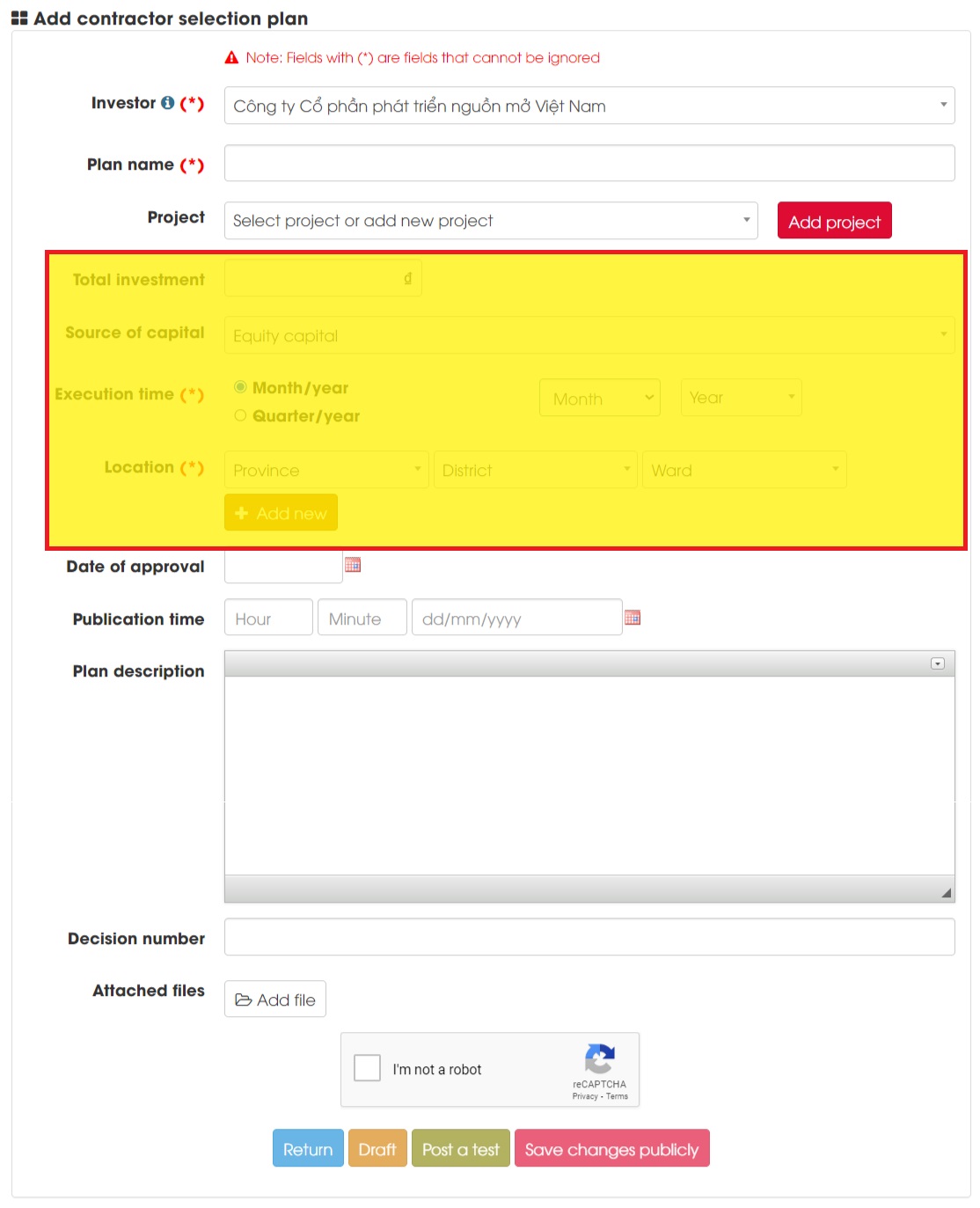
<strong>Case 2</strong>: In case there is no previously declared project, the system allows additional project declaration with two options:
<div style="margin-left:40px">►Option 1: Declare additional projects right on the contractor selection plan declaration form without creating/publicizing the project</div>
<div style="margin-left:80px">* How to do it: in the <strong>Project section</strong> -&gt; select <strong>Select project</strong> or <strong>Add project</strong> -&gt; Proceed to declare project information right below</div>
<div style="margin-left:40px">►Option 2: Declare additional projects by adding a new project, then a new project will be created on the system and made public.</div>
<div style="margin-left:80px">* How to do it: Click the<strong> Add project</strong> function button -&gt; the system will call the project declaration form -&gt; Declare the project and post it as in the <a href="https://dauthau.net/en/news/guides/instructions-for-posting-projects-30.html" target="_blank">Instructions for posting projects</a>.</div>
<div>For information declaring the contractor selection plan as shown in Picture 2.1 above.</div>
<div style="text-align:center">
<div class="image-center">
<figure class="image"><img alt="Picture 2 2 Declare plans in case there is no project yet" height="986" src="https://dauthau.net/uploads/news/2023_10/picture-2.2declare-plans-in-case-there-is-no-project-yet.jpg" width="800" />
<figcaption><em>Picture 2.2. Declare plans in case there is no project yet</em></figcaption>
</figure>
</div>
<ul>
	<li style="text-align: justify;"><u><strong>Step 3</strong></u>: Declare the bidding package for the <strong>Contractor Selection Plan</strong></li>
</ul>
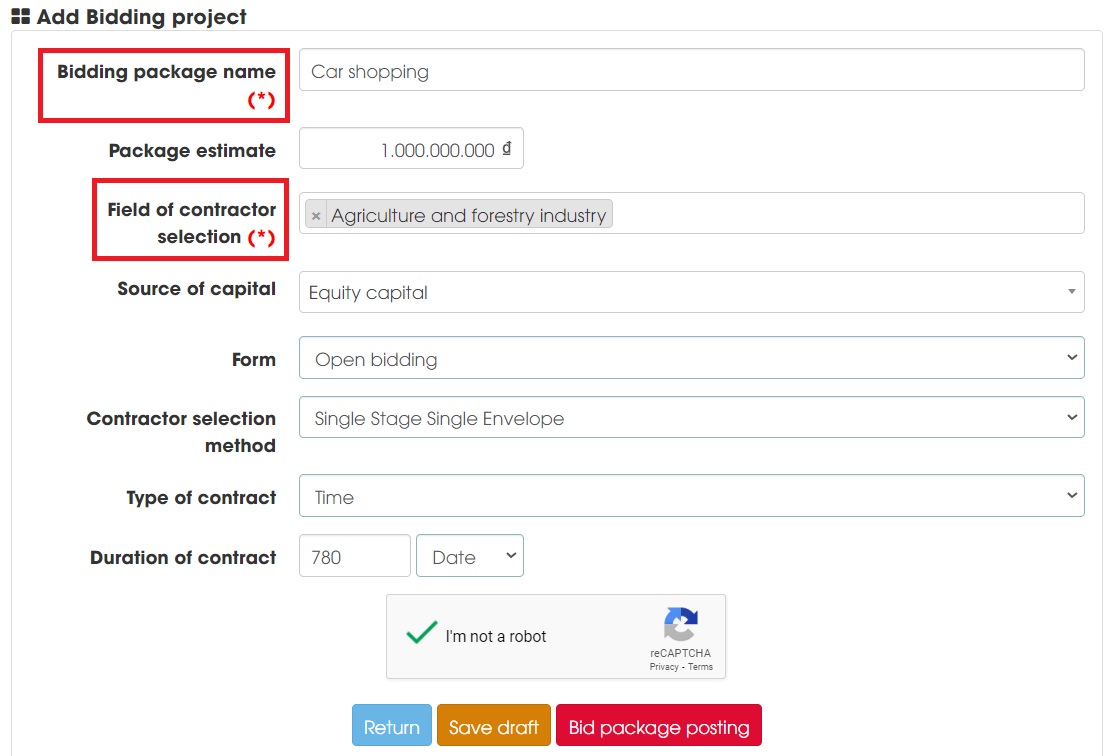
<div style="text-align:justify">After declaring the main information of the Contractor Selection Plan, click<strong> Draft</strong> button (as shown in <em>Picture 2.3</em>), the system will save the draft Contractor Selection Plan and start requesting the declaration of the bidding package, the package declaration form. bid as follows:</div>
<div>
<div class="image-center">
<figure class="image"><img alt="Picture 2 3 Declaration of bidding package" height="544" src="https://dauthau.net/uploads/news/2023_10/picture-2.3-declaration-of-bidding-package.jpg" width="800" />
<figcaption><em>Picture 2.3 Declaration of bidding package</em></figcaption>
</figure>
</div>
<div style="text-align:justify">Mandatory declaration contents include:
<table align="center" border="1" cellpadding="1" cellspacing="1" style="width:800px">
	<tbody>
		<tr>
			<td style="text-align:center"><strong>Information field</strong></td>
			<td style="text-align:center"><strong>Describe</strong></td>
		</tr>
		<tr>
			<td><strong>Bidding package name</strong></td>
			<td>The bidding package name set by the user is consistent with the bidding package intended to invite bids</td>
		</tr>
		<tr>
			<td><strong>Field of contractor<br />
			selection&nbsp;&nbsp;&nbsp;</strong></td>
			<td>Choose 1 of the 39 areas that we have divided<br />
			►<strong>Note</strong>:&nbsp;the contractor selection field allows you to select more than 1 field at a time. Choosing the correct field will help the system find and screen better contractors for the bidding package</td>
		</tr>
	</tbody>
</table>
</div>
<ul>
	<li style="text-align: justify;"><u><strong>Step 4</strong></u>: Post the contractor selection plan</li>
</ul>
<div style="text-align:justify">After declaring the bidding packages in the <strong>Contractor Selection Plan</strong>, we see that the Contractor Selection Plan is being stored as Posted<strong> Draft</strong>.</div>
</div>
</div>
<div style="text-align:center">
<div class="image-center">
<figure class="image"><img alt="Picture 2 4 Status of contractor selection plan" height="264" src="https://dauthau.net/uploads/news/2023_10/picture-2.4status-of-contractor-selection-plan.jpg" width="800" />
<figcaption><em>Picture 2.4. Status of contractor selection plan</em></figcaption>
</figure>
</div>
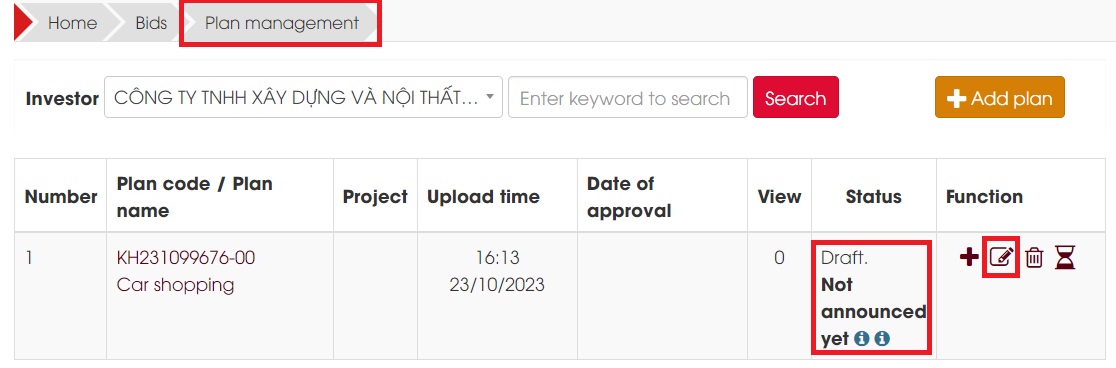
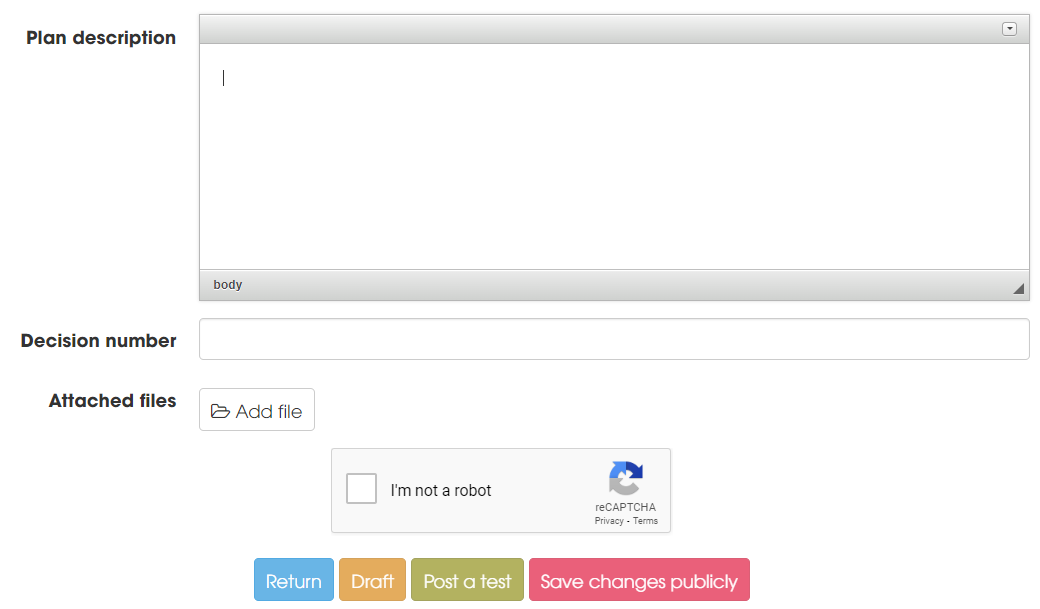
<div style="text-align:justify">How to do it: Use the <strong>Edit</strong> button in the <strong>Function</strong> area (See Picture 2.4), after reviewing the information of the contractor selection plan again, if there is no need to add anything, click <strong>Save changes Public</strong> button ( See Picture 2.5)</div>
<div>
<div class="image-center">
<figure class="image"><img alt="Picture 2 5 Publicly post the contractor selection plan" height="468" src="https://dauthau.net/uploads/news/2023_10/picture-2.5publicly-post-the-contractor-selection-plan.png" width="800" />
<figcaption><em>Picture 2.5. Publicly post the contractor selection plan</em></figcaption>
</figure>
</div>
</div>
</div>
<h2>3. Edit or delete/cancel the contractor selection plan</h2>
<h3>Edit the contractor selection plan</h3>
<ul>
	<li>
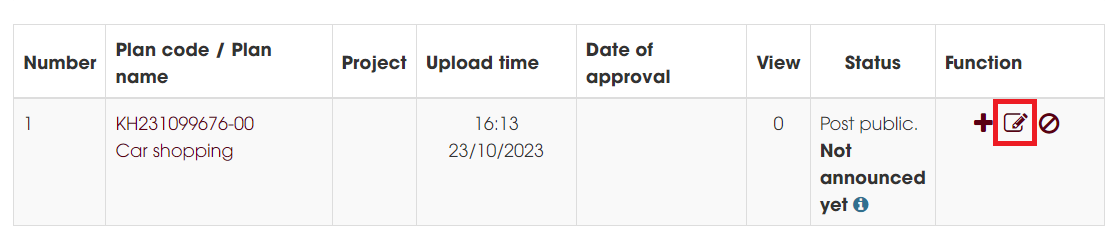
	<p><u><strong>Step 1</strong></u>: In the <strong>Functions </strong>area -&gt; select the<strong> Edit </strong>button.</p>
	</li>
</ul>
<div style="text-align:center">
<div class="image-center">
<figure class="image"><img alt="Picure 3 1 Edit contractor selection" height="167" src="https://dauthau.net/uploads/news/2023_10/picure-3.1edit-contractor-selection.png" width="800" />
<figcaption><em>Picure 3.1. Edit contractor selection</em></figcaption>
</figure>
</div>
</div>
<ul>
	<li><u><strong>Step 2</strong></u>: Edit the information as needed and press the <strong>Save changes</strong> button. For each revision of the Contractor Selection Plan, the system will record the Plan Code with changes in the form ending -0n or -nn.</li>
</ul>
<em>***<u><strong>Note</strong></u>: For Contractor Selection Plans that are in draft posting status, we can use the Edit function to edit multiple times without changing the Plan code.</em>
<h3>Delete or cancel the contractor selection plan</h3>
For contractor selection plans that are in <strong>Draft </strong>status, they can be permanently deleted from the system. For contractor selection plans that have been posted <strong>publicly</strong>, the plan can only be canceled.<br />
To delete or cancel, use the <strong>Delete</strong> function button (for draft posts) or <strong>cancel</strong> (for public posts in the <strong>Function</strong> area. When canceling, the system will ask to declare the <strong>Cancel reason</strong>&nbsp;(see Picture 3.2).
<div style="text-align:center">
<div class="image-center">
<figure class="image"><img alt="Picture 3 2 Delete or cancel the contractor selection plan" height="407" src="https://dauthau.net/uploads/news/2023_10/picture-3.2-delete-or-cancel-the-contractor-selection-plan.png" width="800" />
<figcaption><em>Picture 3.2 Delete or cancel the contractor selection plan</em></figcaption>
</figure>
</div>
</div>
<div style="text-align:justify">Above is an article with instructions for posting a Contractor Selection Plan on Vietnam&#039;s first private bidding network DauThau.Net. In case you need support, please contact us immediately:</div>
<ul>
	<li style="text-align: justify;">Hotline:&nbsp;0904634288</li>
	<li style="text-align: justify;">Email: contact@dauthau.info</li>
</ul>
<div style="text-align:justify"><em>Sincerely thank you!</em></div>
		</div>
				<div id="author">
						<p>
				<strong>Author:</strong>
				<a href="https://dauthau.net/en/news/author/Linh-Ho-Thi/">Linh Hồ Thị</a>
			</p>
		</div>
	</div>
	<div id="footer" class="clearfix">
		<div id="url">
			<strong>URL of this newsletter: </strong><a href="https://dauthau.net/en/news/savefile/guides/instructions-for-posting-the-contractor-selection-plan-31.html" title="Instructions for posting the Contractor Selection Plan">https://dauthau.net/en/news/savefile/guides/instructions-for-posting-the-contractor-selection-plan-31.html</a>
		</div>
		<div class="clear"></div>
		<div class="copyright">
			&copy; DauThau.Net - The first private bidding network in Vietnam
		</div>
		<div id="contact">
			<a href="mailto:info@dauthau.net">info@dauthau.net</a>
		</div>
	</div>
</div>
        <div id="timeoutsess" class="chromeframe">
            You did not use the site, <a onclick="timeoutsesscancel();" href="https://dauthau.net/#">Click here to remain logged</a>. Timeout: <span id="secField"> 60 </span> second
        </div>
        <div id="openidResult" data-sso-domain="https://iportal.vn" class="nv-alert" style="display:none"></div>
        <div id="openidBt" data-result="" data-redirect=""></div>
<script src="https://dauthau.net/assets/js/jquery/jquery.min.js"></script>
<script>var nv_base_siteurl="/",nv_assets_dir="assets",nv_lang_data="en",nv_lang_interface="en",nv_name_variable="nv",nv_fc_variable="op",nv_lang_variable="language",nv_module_name="news",nv_func_name="savefile",nv_is_user=0, nv_my_ofs=7,nv_my_abbr="+07",nv_cookie_prefix="dtck_net",nv_check_pass_mstime=29938000,nv_area_admin=0,nv_safemode=0,theme_responsive=1,nv_recaptcha_ver=2,nv_recaptcha_sitekey="6Le3vNwZAAAAAMS4qqVRkuat62k2nMRHBos2KR4P",nv_recaptcha_type="image",nv_turnstile_sitekey="",XSSsanitize=0,nv_jsdate_get="mm-dd-yyyy",nv_jsdate_post="mm/dd/yyyy",nv_js_am="AM",nv_js_pm="PM",nv_gfx_width="150",nv_gfx_height="40",nv_gfx_num="6",nv_cache_timestamp=1790159315;</script>
<script src="https://dauthau.net/assets/js/language/en.js"></script>
<script src="https://dauthau.net/assets/js/global.js"></script>
<script src="https://dauthau.net/assets/js/site.js"></script>
<script src="https://dauthau.net/assets/js/moment/moment.min.js"></script>
<script src="https://dauthau.net/themes/dauthau/js/news.js"></script>
<script src="https://dauthau.net/assets/js/perfect-scrollbar/min.js"></script>
<script src="https://dauthau.net/themes/dauthau/js/main.js"></script>
<script>var domain_load_remote = 'https://api.dauthau.asia/';</script>
<script type="application/ld+json">
{
    "@context": "https://schema.org",
    "@type": "WebSite",
    "name": "DauThau.Net - The first private bidding network in Vietnam",
    "url": "https://dauthau.net/",
    "potentialAction": {
        "@type": "SearchAction",
        "target": {
            "@type": "EntryPoint",
            "urlTemplate": "https://dauthau.net/en/seek/?q={search_term_string}"
        },
        "query-input": "required name=search_term_string"
    }
}
</script>
<script>if(window.top!==window.self){document.write="";window.top.location=window.self.location;setTimeout(function(){document.body.innerHTML=""},1);window.self.onload=function(){document.body.innerHTML=""}};</script>
<script src="https://dauthau.net/themes/dauthau/js/bootstrap.min.js"></script>
<script src="https://marketing.dauthau.asia/webpush/sdk/vi/load.js?id=m2abiiu6-r3mu-f8d5-t6kz-l01ejj1hkzgh" defer></script>
</body>
</html>