<!DOCTYPE html>
    <html lang="en" xmlns="http://www.w3.org/1999/xhtml" prefix="og: http://ogp.me/ns#">
    <head>
<title>Instructions for clarifying bidding documents - News - DauThau.Net</title>
<meta name="description" content="Instructions for clarifying bidding documents - Savefile - News -...">
<meta name="author" content="DauThau.Net - The first private bidding network in Vietnam">
<meta name="copyright" content="DauThau.Net - The first private bidding network in Vietnam [info@dauthau.net]">
<meta name="apple-mobile-web-app-capable" content="yes">
<meta name="generator" content="NukeViet v5.0">
<meta name="viewport" content="width=device-width, initial-scale=1">
<meta http-equiv="Content-Type" content="text/html; charset=utf-8">
<meta property="og:title" content="Instructions for clarifying bidding documents">
<meta property="og:type" content="website">
<meta property="og:description" content="Savefile - News - https&#x3A;&#x002F;&#x002F;dauthau.net&#x002F;en&#x002F;news&#x002F;savefile&#x002F;contractors&#x002F;instructions-for-clarifying-bidding-documents-39.html">
<meta property="og:site_name" content="DauThau.Net - The first private bidding network in Vietnam">
<meta property="og:url" content="https://dauthau.net/en/news/savefile/contractors/instructions-for-clarifying-bidding-documents-39.html">
<meta property="og:locale" content="en_US">
<meta property="fb:app_id" content="381865416432774">
<meta property="fb:pages" content="108252627774399">
<meta property="fb:admins" content="100001604800244">
<link rel="shortcut icon" href="https://dauthau.net/uploads/dauthau.net-ico-01.ico">
<link rel="canonical" href="https://dauthau.net/en/news/savefile/contractors/instructions-for-clarifying-bidding-documents-39.html">
<link rel="alternate" href="https://dauthau.net/en/news/rss/" title="News" type="application/rss+xml">
<link rel="alternate" href="https://dauthau.net/en/news/rss/notification/" title="News - Notification" type="application/rss+xml">
<link rel="alternate" href="https://dauthau.net/en/news/rss/hot-news/" title="News - Hot News" type="application/rss+xml">
<link rel="alternate" href="https://dauthau.net/en/news/rss/bid-solicitors/" title="News - Bid solicitors" type="application/rss+xml">
<link rel="alternate" href="https://dauthau.net/en/news/rss/contractors/" title="News - Contractors" type="application/rss+xml">
<link rel="alternate" href="https://dauthau.net/en/news/rss/business-news/" title="News - Business news" type="application/rss+xml">
<link rel="alternate" href="https://dauthau.net/en/news/rss/guides/" title="News - Guides" type="application/rss+xml">
<link rel="alternate" href="https://dauthau.net/en/news/rss/blog/" title="News - Blog" type="application/rss+xml">
<link rel="manifest" href="https://dauthau.net/manifest.webmanifest">
<link rel="stylesheet" href="/assets/css/core.r.min.css?t=1776347191">
<link rel="stylesheet" href="https://dauthau.net/themes/dauthau/css/dauthau.responsive.css">
<link rel="stylesheet" href="https://dauthau.net/themes/dauthau/css/news.css">
<style type="text/css">
	body{background: #fff;}
</style>
                <!-- Google Tag Manager -->
        <script>(function(w,d,s,l,i){w[l]=w[l]||[];w[l].push({'gtm.start':
        new Date().getTime(),event:'gtm.js'});var f=d.getElementsByTagName(s)[0],
        j=d.createElement(s),dl=l!='dataLayer'?'&l='+l:'';j.async=true;j.src=
        'https://www.googletagmanager.com/gtm.js?id='+i+dl;f.parentNode.insertBefore(j,f);
        })(window,document,'script','dataLayer','GTM-PTDVGWXN');</script>
        <!-- End Google Tag Manager -->
</head>
    <body>
<div id="print">
	<div id="hd_print">
		<h2 class="pull-left">DauThau.Net - The first private bidding network in Vietnam</h2>
		<p class="pull-right"><a title="DauThau.Net - The first private bidding network in Vietnam" href="https://dauthau.net/">https://dauthau.net</a></p>
	</div>
	<div class="clear"></div>
	<hr />
	<div id="content">
		<h1>Instructions for clarifying bidding documents</h1>
		<ul class="list-inline">
			<li>Monday, 06 April 2026 1:30 PM</li>
			<li class="hidden-print txtrequired"><em class="fa fa-print">&nbsp;</em><a title="Print" href="https://dauthau.net/#" data-toggle="winCMD" data-cmd="print">Print</a></li>
			<li class="hidden-print txtrequired"><em class="fa fa-power-off">&nbsp;</em><a title="Close page" href="https://dauthau.net/#" data-toggle="winCMD" data-cmd="close">Close page</a></li>
		</ul>
		<div class="clear"></div>
		<div id="hometext">
			Clarifying bidding documents is one of the steps to help contractors and bidding parties better understand the bidding package they are interested in. Therefore, DauThau.Net has developed a feature to clarify bidding documents on the system to help optimize the usage process for users. So how is this feature used? Please read the following article.
		</div>
		<div id="bodytext" class="clearfix">
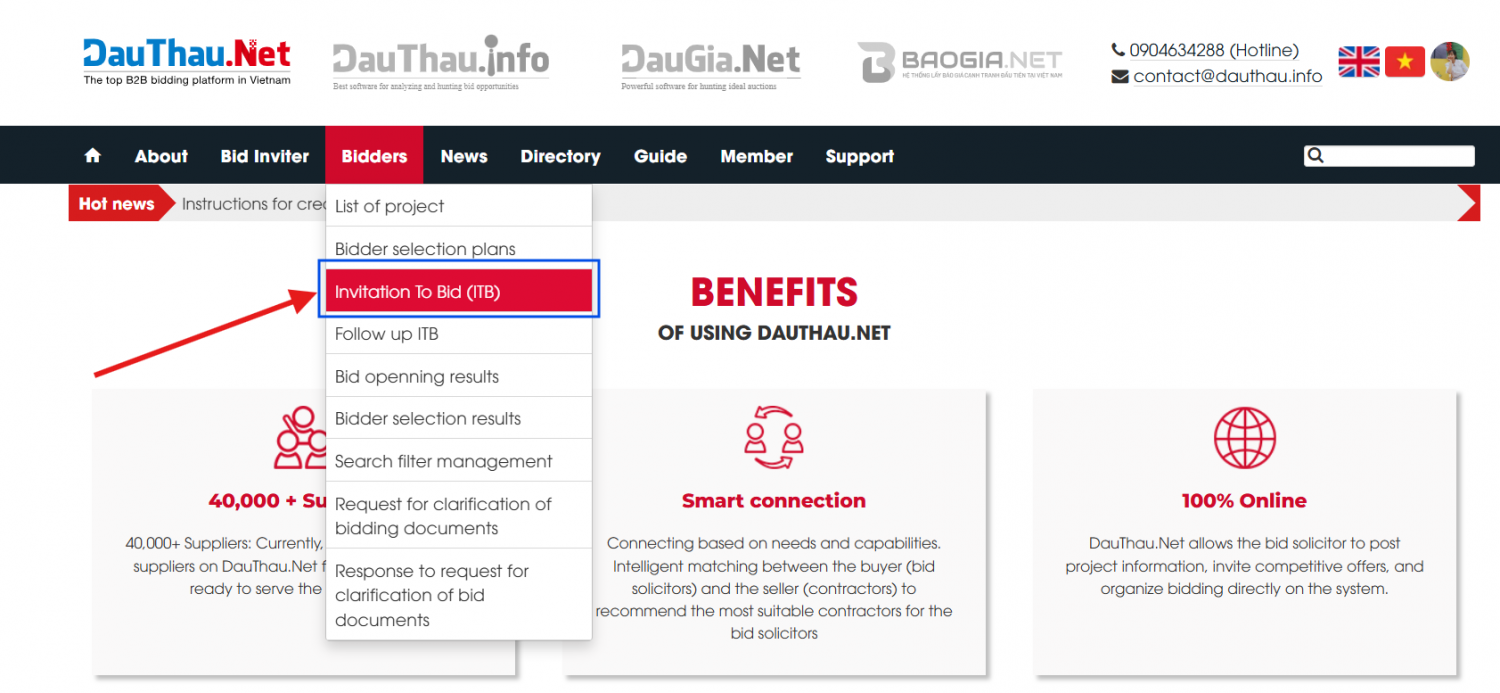
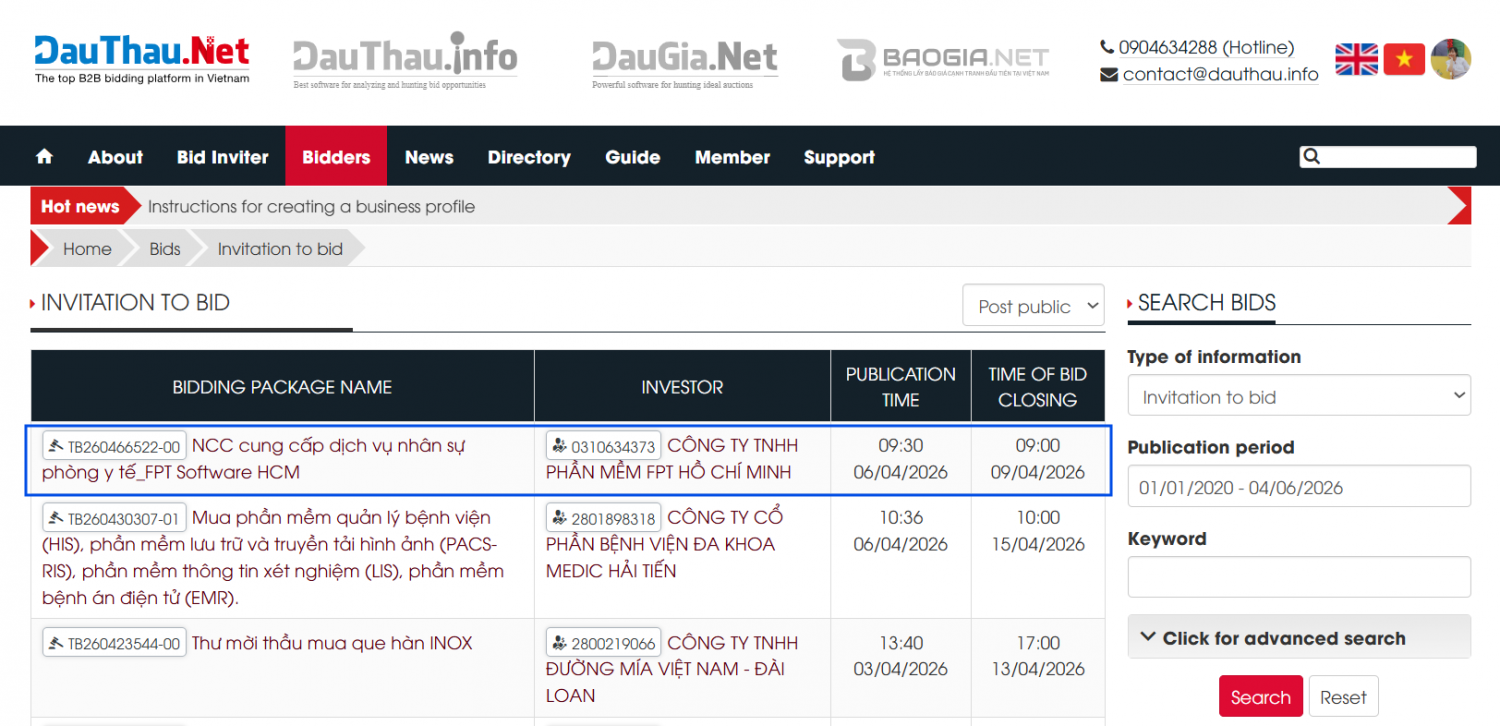
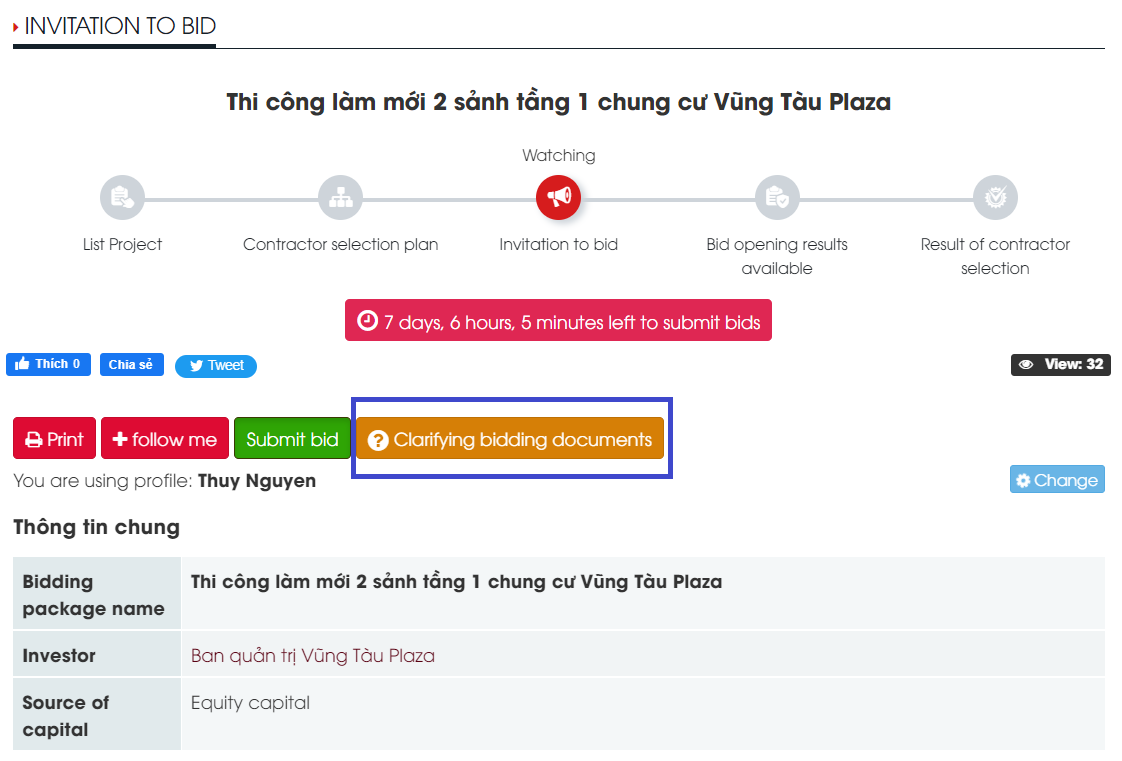
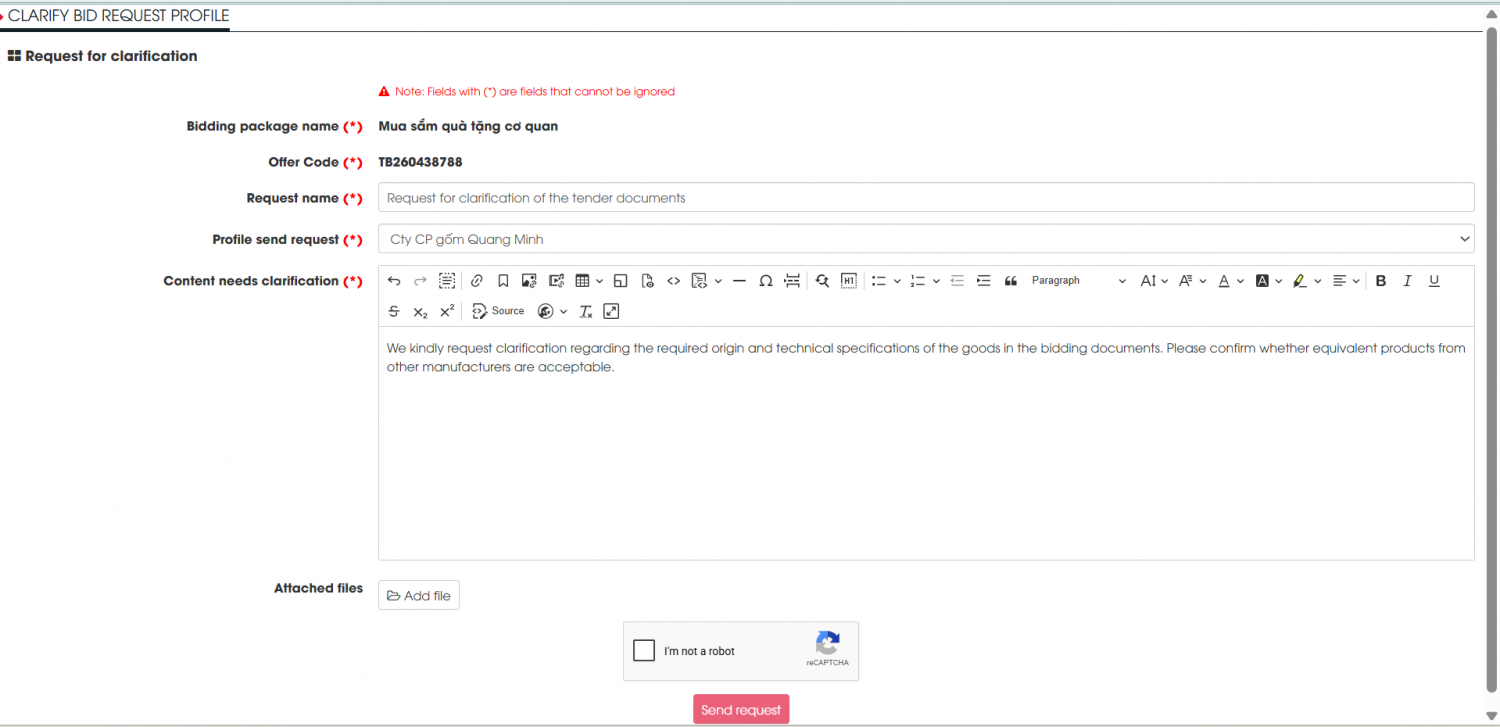
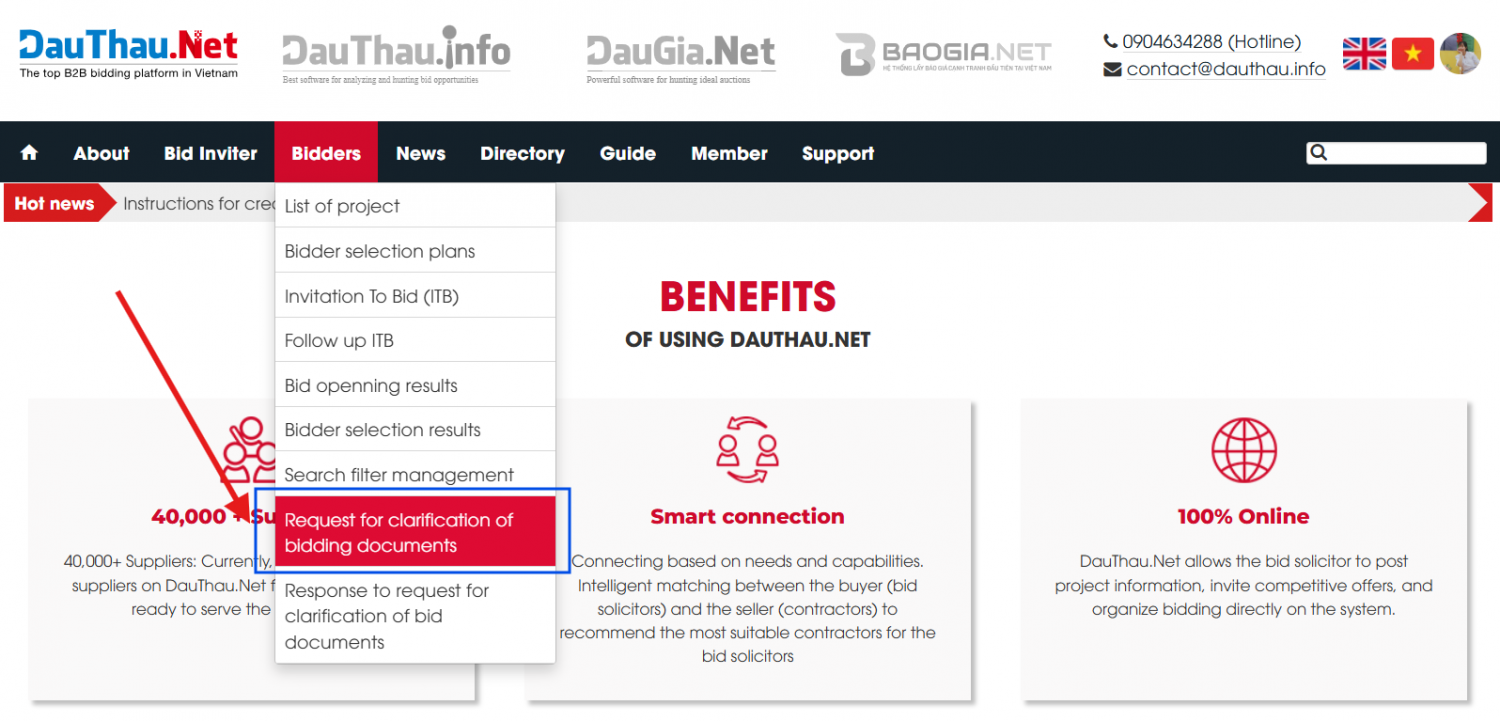
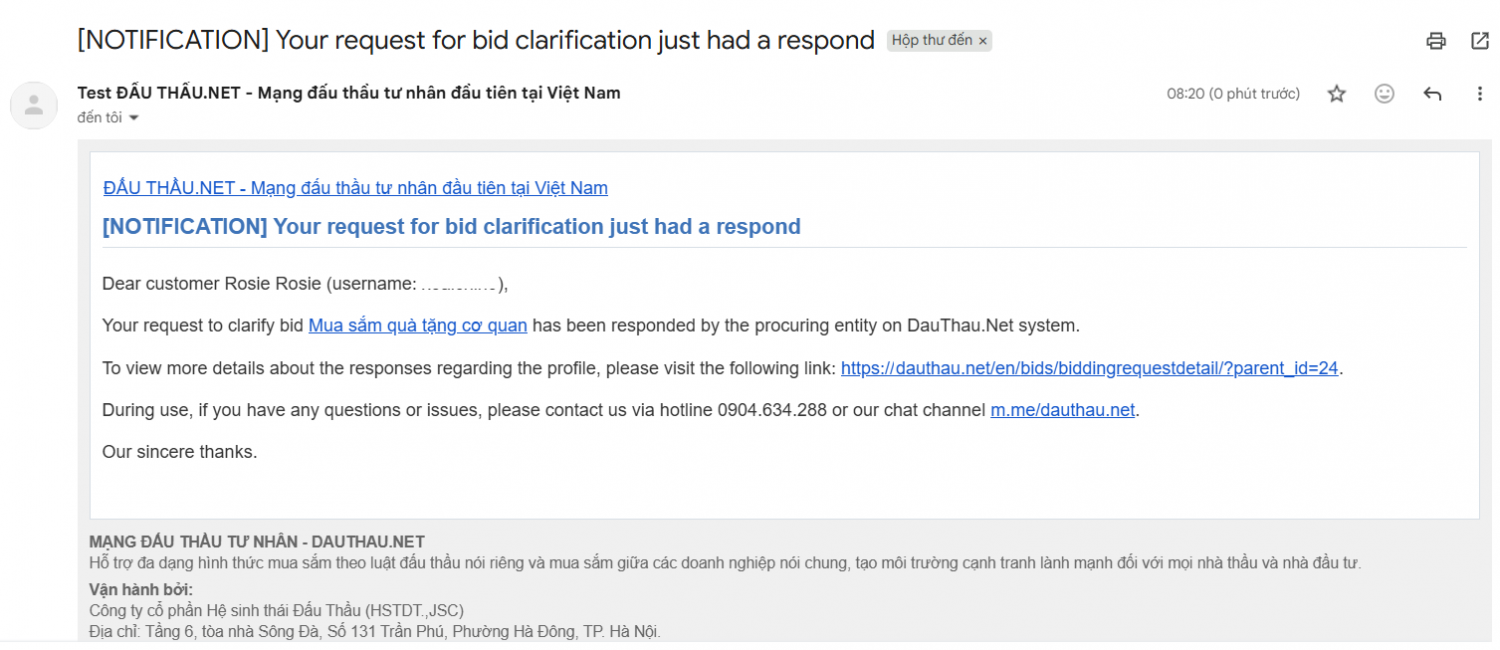
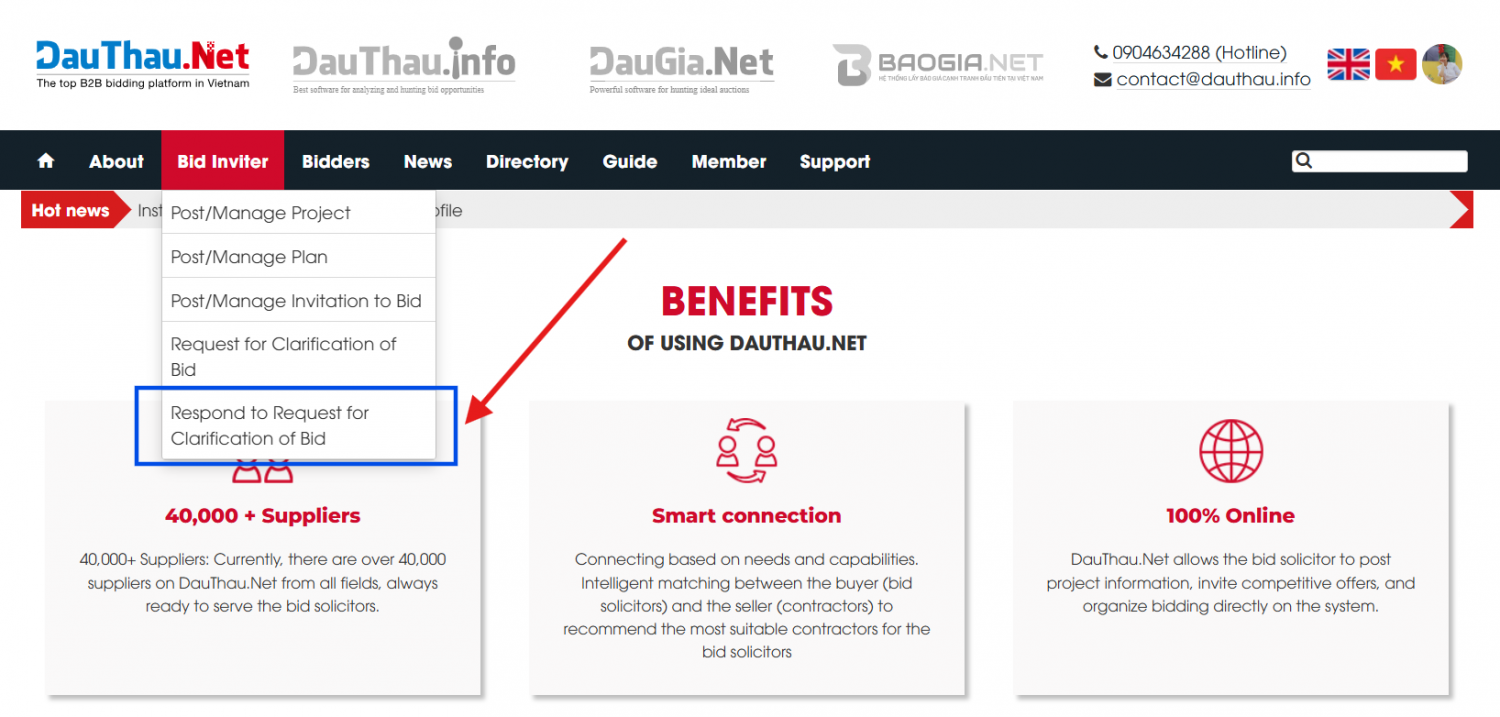
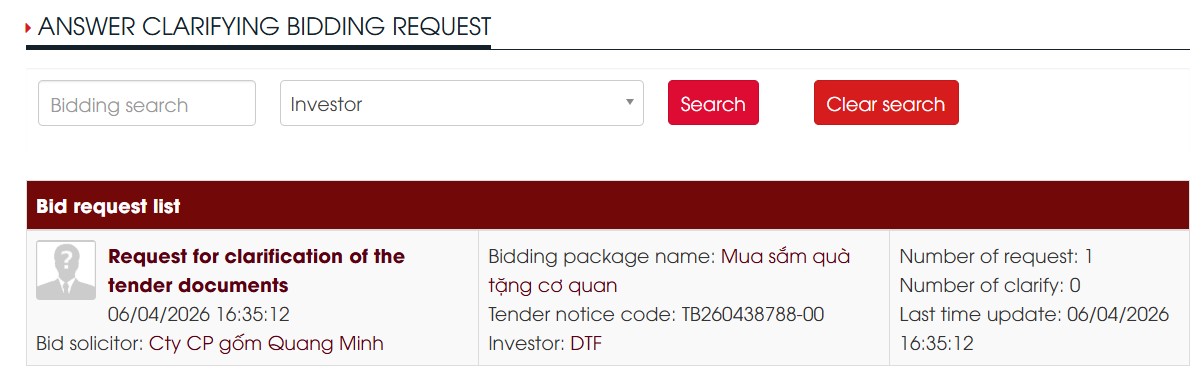
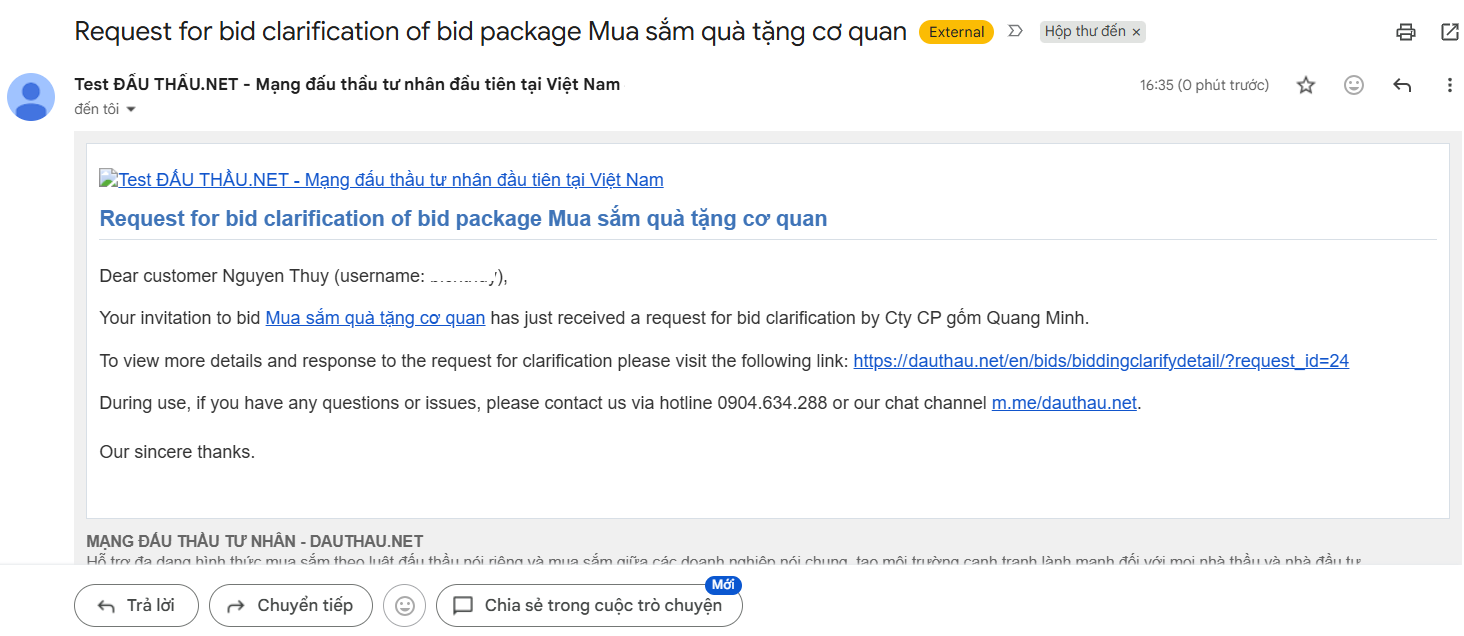
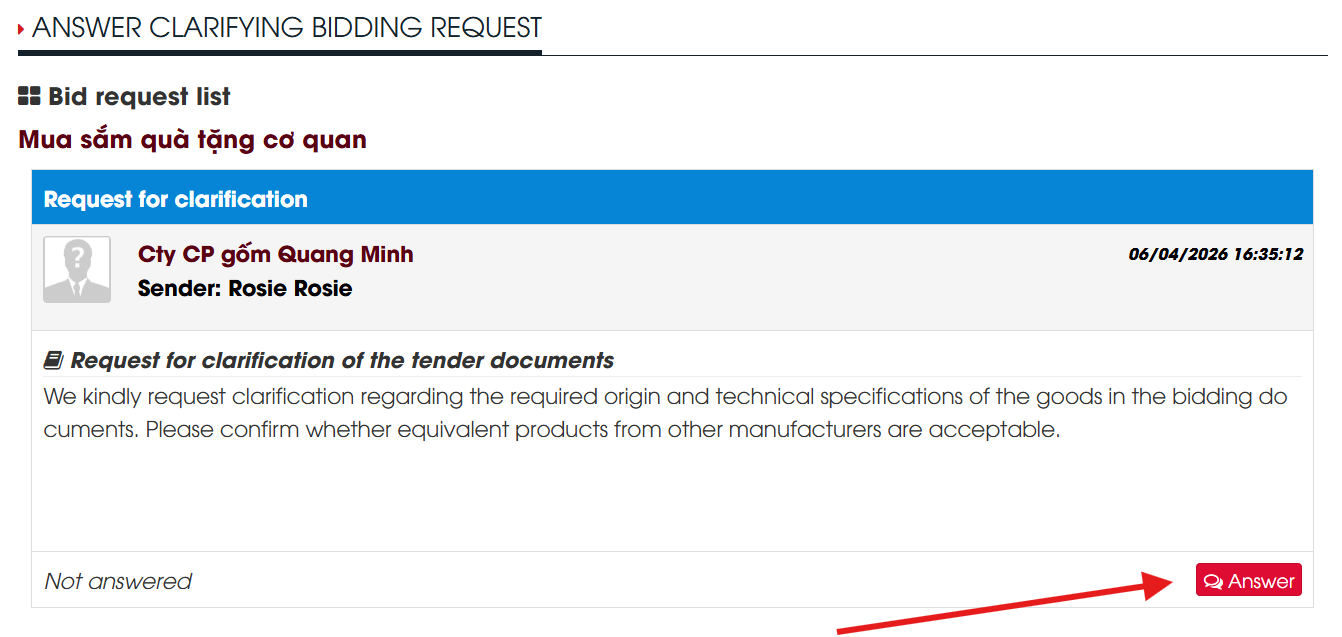
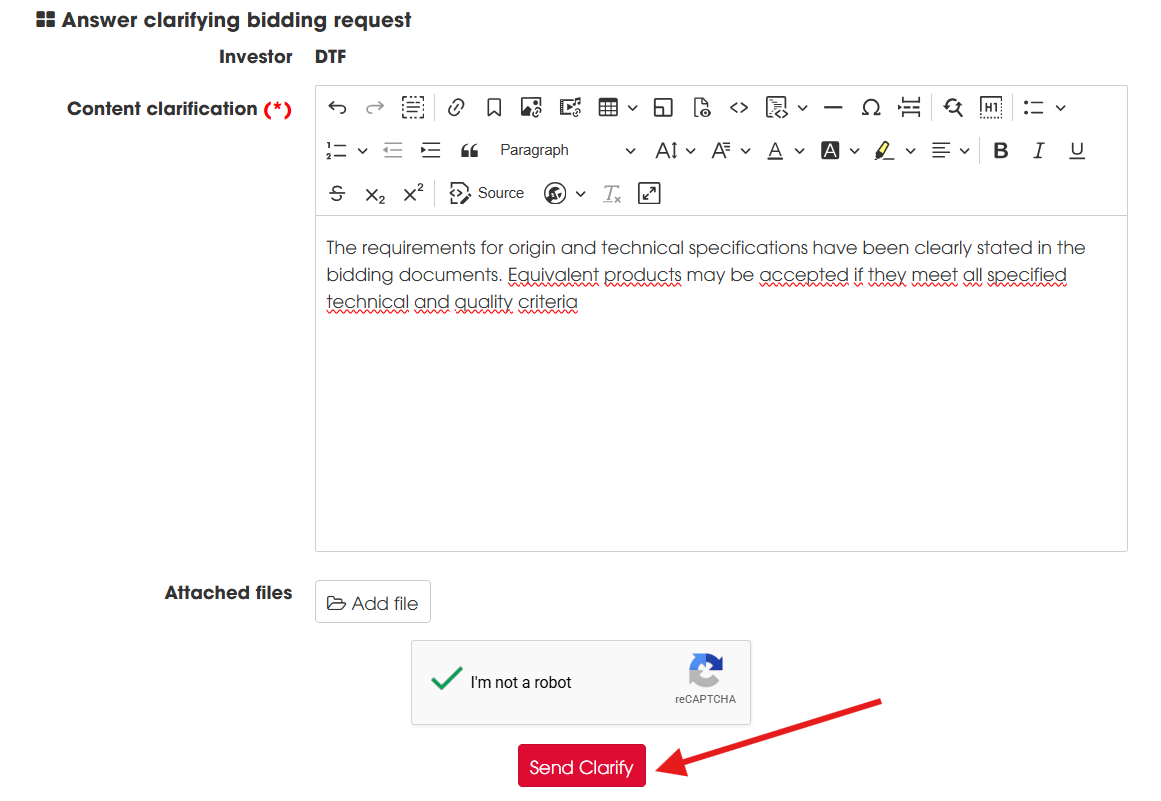
			<figure class="image"><img style="aspect-ratio:1200/630;" src="https://dauthau.net/uploads/news/2026_02/dauthau.net_2.jpg" alt="DauThau Net" width="1200" height="630" /></figure><p style="text-align:justify;" dir="ltr"><i>Nhấn </i><a target="_blank" rel="noopener noreferrer" href="https://dauthau.net/vi/news/huong-dan/huong-dan-lam-ro-ho-so-moi-thau-72.html"><i><strong>VÀO ĐÂY</strong></i></a><i><strong> </strong>để chuyển bài viết sang bản tin tiếng Việt</i></p><h2 style="text-align:justify;" dir="ltr"><strong>Instructions for clarifying bidding documents</strong></h2><p style="text-align:justify;" dir="ltr">To track bidding documents, users need to follow the following instructions:</p><div style="text-align:justify;"><strong><u>Step 1</u></strong>:<strong> </strong>Access the menu<strong> Bidders -&gt; </strong>Select <strong>InvitationTo Bid (ITB)</strong>.</div><figure class="image"><img style="aspect-ratio:1500/693;" src="https://dauthau.net/uploads/news/2023_11/access-the-bidding-menu-and-select-tender-notice.png" width="1500" height="693" /></figure><p style="text-align:center;"><i>Picture 1.1: Access the bidding menu and select tender notice</i></p><p style="text-align:justify;" dir="ltr"><strong><u>Step 2</u></strong>: After accessing <strong>Invitation To Bid (ITB) </strong>The screen appears as shown below, the user selects the desired bidding package.</p><figure class="image"><img style="aspect-ratio:1500/726;" src="https://dauthau.net/uploads/news/2023_11/select-the-bidding-notice-you-want-to-clarify.png" width="1500" height="726" /></figure><div class="image-center"><p style="text-align:center;"><i>Picture 1.2 Select the bidding notice you want to clarify</i></p></div><p style="text-align:justify;" dir="ltr"><strong><u>Step 3</u></strong>:<strong> </strong>Select the bidding package that needs clarification -&gt; <strong>Select Clarifying the bidding documents</strong>.&nbsp;</p><div class="image-center"><figure class="image image_resized" style="width:100%;"><img style="aspect-ratio:1122/761;" src="https://dauthau.net/uploads/news/2023_11/picture-1.3-select-clarify-bidding-documents-to-clarify-necessary-information-about-the-bidding-package-that-the-user-is-interested-in.png" alt="Picture 1 3 Select clarify bidding documents to clarify necessary information about the bidding package that the user is interested in" width="1122" height="761" /><figcaption><i>Picture 1.3 Select clarify bidding documents to clarify necessary information about the bidding package that the user is interested in</i></figcaption></figure></div><p style="text-align:justify;" dir="ltr" role="presentation"><strong><u>Step 4</u>: </strong>Fill in the form to request clarification of bidding documents, including the following information:<strong>&nbsp;</strong></p><ul><li class="ck-list-marker-bold" data-list-item-id="e7ceb5069d74fe010d69a408551d17ecc"><p style="text-align:justify;" dir="ltr" role="presentation"><b data-path-to-node="1,0,0" data-index-in-node="0"><strong>Bidding package name&nbsp;</strong></b></p></li><li class="ck-list-marker-bold" data-list-item-id="ed2fc197a003f881138af6b5ceda01f1d"><p data-path-to-node="1,1,0"><b data-path-to-node="1,1,0" data-index-in-node="0"><strong>Offer Code&nbsp;</strong></b></p></li><li class="ck-list-marker-bold" data-list-item-id="e94c0deb8ac2b500221d399ca467cfddd"><p data-path-to-node="1,2,0"><b data-path-to-node="1,2,0" data-index-in-node="0"><strong>Request name&nbsp;</strong></b></p></li><li class="ck-list-marker-bold" data-list-item-id="e75281058af8f09c7959f8bf169933c9b"><p data-path-to-node="1,3,0"><b data-path-to-node="1,3,0" data-index-in-node="0"><strong>Profile send request&nbsp;</strong></b></p></li><li class="ck-list-marker-bold" data-list-item-id="e80aa1703da8d04a49989e942b4469b4a"><p data-path-to-node="1,4,0"><b data-path-to-node="1,4,0" data-index-in-node="0"><strong>Content needs clarification&nbsp;</strong></b></p></li><li class="ck-list-marker-bold" data-list-item-id="ed2b1c9c8529cba4eb33f71b18e76de20"><p data-path-to-node="1,5,0"><b data-path-to-node="1,5,0" data-index-in-node="0"><strong>Attached files</strong></b><strong>&nbsp;</strong></p></li></ul><p data-path-to-node="1,5,0">-&gt;<strong> </strong>Select <strong>Send request </strong>for clarification<strong>.</strong></p><figure class="image"><img style="aspect-ratio:1500/727;" src="https://dauthau.net/uploads/news/2026_02/fill-in-the-necessary-information-in-the-form-to-submit-a-request-for-clarification-of-the-bidding-documents.png" width="1500" height="727" /></figure><div class="image-center"><p style="text-align:center;"><i>Figure 1.4 Fill in the necessary information in the form to submit a request for clarification of the Bidding Documents</i></p></div><p style="text-align:justify;" dir="ltr" role="presentation"><strong><u>Step 5:</u> </strong>To view the request for clarification of the HSMT just sent, the user accesses the menu<strong> Contractors </strong>-&gt;<strong> </strong>Select <strong>Request clarification of bidding documents </strong>the screen will display a request to clarify the bidding documents that the user just sent.</p><figure class="image"><img style="aspect-ratio:1500/721;" src="https://dauthau.net/uploads/news/2023_11/request-clarification-of-bidding-documents.png" width="1500" height="721" /></figure><p style="text-align:center;" dir="ltr"><i>Picture 1.5 Request for clarification of bidder&#039;s Bidding Documents after sending to the bidding party&nbsp;</i></p><p style="text-align:justify;" dir="ltr">After receiving a request to clarify the bidding documents from the contractor, the bidding party will respond to the request to clarify the bidding documents sent by the contractor. When the bidding party responds, the response notice will be sent to the contractor&#039;s email as shown below.</p><figure class="image"><img style="aspect-ratio:1500/650;" src="https://dauthau.net/uploads/news/2026_02/yeu-cau-lam-ro-ho-so-du-thau-cua-ban-da-duoc-tra-loi.png" width="1500" height="650" /></figure><p style="text-align:center;" dir="ltr"><i>Picture 1.6 Email notification that your request to clarify your Bidding Documents has been replied</i></p><h2 style="text-align:justify;" dir="ltr"><strong>Instruct the bidding party to manage and clarify the bidding documents</strong></h2><p style="text-align:justify;" dir="ltr">To respond to requests for clarification of bidding documents from contractors who have sent bidding notices that the user is managing, need to follow these steps:</p><p style="text-align:justify;" dir="ltr" role="presentation"><strong><u>Step 1:</u> </strong>Accesses the selection menu <strong>Bid Inviter </strong>-&gt; <strong>Respondto Request for Clarificcation of Bid</strong>.</p><figure class="image"><img style="aspect-ratio:1500/717;" src="https://dauthau.net/uploads/news/2023_11/accessing-the-bidding-party-menu-to-respond-to-requests-for-clarification-of-bidding-documents-from-bidders.png" width="1500" height="717" /></figure><figure class="image"><img style="aspect-ratio:1202/384;" src="https://dauthau.net/uploads/news/2026_02/accessing-the-bidding-party-menu-to-respond-to-requests-for-clarification-of-bidding-documents.png" width="1202" height="384" /></figure><p style="text-align:center;" dir="ltr"><i>Picture 2.1 Accessing the bidding party menu to respond to requests for clarification of bidding documents from bidders&nbsp;</i></p><p style="background-color:rgb(255, 255, 255);line-height:1.38;margin-bottom:11pt;margin-top:0pt;text-align:justify;" dir="ltr"><span style="background-color:transparent;color:rgb(51,51,51);font-family:Arial,sans-serif;font-size:12pt;"><span style="font-style:normal;font-variant:normal;font-weight:400;text-decoration:none;vertical-align:baseline;white-space:pre-wrap;">Simultaneously, the bidding party/investor also receives a reminder email when a bidder submits a request for clarification of the bidding documents.</span></span></p><figure class="image"><img style="aspect-ratio:1464/636;" src="https://dauthau.net/uploads/news/2026_02/email-nhac-nho-cdt-bmt.png" width="1464" height="636" /></figure><p style="text-align:center;" dir="ltr"><i>Picture 2.2&nbsp;Screenshot of the email reminding the bidding party/investor when a bidder submits a request for clarification of the bidding documents.</i></p><p style="text-align:justify;" dir="ltr" role="presentation"><strong><u>Step 2:</u> </strong>At the <strong>Bid Request List</strong>, choose the clarification request for bidding documents sent by contractors concerning the posted bidding package.</p><figure class="image"><img style="aspect-ratio:1342/637;" src="https://dauthau.net/uploads/news/2026_02/select-the-request.png" width="1342" height="637" /></figure><p style="text-align:center;" dir="ltr"><i>Picture 2.3 Select the request to clarify the Bidding Documents that need to be clarified&nbsp;</i></p><p style="text-align:justify;" dir="ltr" role="presentation"><strong><u>Step 3:</u> </strong>Enter your answer in the <strong>Clarification Response</strong> section<strong>. </strong>Press select button<strong> Submit Reply </strong>to respond to request for clarification of bidding documents from the contractor.</p><figure class="image"><img style="aspect-ratio:1161/801;" src="https://dauthau.net/uploads/news/2026_02/select-the-request-to-clarify-the-bidding-documents-that-need-to-be-clarified.png" width="1161" height="801" /></figure><p style="text-align:center;" dir="ltr"><i>Picture 2.4 Click the answer button to respond to the contractor&#039;s request to clarify the bidding Documents&nbsp;</i></p><p style="text-align:justify;" dir="ltr">The above article of DauThau.Net has shared with users the steps to clarify the HSMT during use. If you have any questions, please contact us immediately at hotline <a href="tel:0904634288">0904634288</a> for support.</p><p style="text-align:justify;" dir="ltr"><i>Sincerely thank you!</i></p>
		</div>
				<div id="author">
						<p>
				<strong>Author:</strong>
				<a href="https://dauthau.net/en/news/author/Nguyen-Bich-Thuy/">Nguyen Bich Thuy</a>
			</p>
		</div>
	</div>
	<div id="footer" class="clearfix">
		<div id="url">
			<strong>URL of this newsletter: </strong><a href="https://dauthau.net/en/news/savefile/contractors/instructions-for-clarifying-bidding-documents-39.html" title="Instructions for clarifying bidding documents">https://dauthau.net/en/news/savefile/contractors/instructions-for-clarifying-bidding-documents-39.html</a>
		</div>
		<div class="clear"></div>
		<div class="copyright">
			&copy; DauThau.Net - The first private bidding network in Vietnam
		</div>
		<div id="contact">
			<a href="mailto:info@dauthau.net">info@dauthau.net</a>
		</div>
	</div>
</div>
        <div id="timeoutsess" class="chromeframe">
            You did not use the site, <a onclick="timeoutsesscancel();" href="https://dauthau.net/#">Click here to remain logged</a>. Timeout: <span id="secField"> 60 </span> second
        </div>
        <div id="openidResult" data-sso-domain="https://iportal.vn" class="nv-alert" style="display:none"></div>
        <div id="openidBt" data-result="" data-redirect=""></div>
<script src="https://dauthau.net/assets/js/jquery/jquery.min.js"></script>
<script>var nv_base_siteurl="/",nv_assets_dir="assets",nv_lang_data="en",nv_lang_interface="en",nv_name_variable="nv",nv_fc_variable="op",nv_lang_variable="language",nv_module_name="news",nv_func_name="savefile",nv_is_user=0, nv_my_ofs=7,nv_my_abbr="+07",nv_cookie_prefix="dtck_net",nv_check_pass_mstime=29938000,nv_area_admin=0,nv_safemode=0,theme_responsive=1,nv_recaptcha_ver=2,nv_recaptcha_sitekey="6Le3vNwZAAAAAMS4qqVRkuat62k2nMRHBos2KR4P",nv_recaptcha_type="image",nv_turnstile_sitekey="",XSSsanitize=0,nv_jsdate_get="mm-dd-yyyy",nv_jsdate_post="mm/dd/yyyy",nv_js_am="AM",nv_js_pm="PM",nv_gfx_width="150",nv_gfx_height="40",nv_gfx_num="6",nv_cache_timestamp=1776347191;</script>
<script src="https://dauthau.net/assets/js/language/en.js"></script>
<script src="https://dauthau.net/assets/js/global.js"></script>
<script src="https://dauthau.net/assets/js/site.js"></script>
<script src="https://dauthau.net/assets/js/plugins.js"></script>
<script src="https://dauthau.net/themes/dauthau/js/news.js"></script>
<script src="https://dauthau.net/themes/dauthau/js/main.js"></script>
<script>var domain_load_remote = 'https://api.dauthau.asia/';</script>
<script type="application/ld+json">
{"@context":"https://schema.org","@type":"WebSite","name":"DauThau.Net - The first private bidding network in Vietnam","url":"https://dauthau.net/","potentialAction":{"@type":"SearchAction","target":{"@type":"EntryPoint","urlTemplate":"https://dauthau.net/en/seek/?q={search_term_string}"},"query-input":"required name=search_term_string"}}
</script>
<script src="https://dauthau.net/themes/dauthau/js/bootstrap.min.js"></script>
<script src="https://marketing.dauthau.asia/webpush/sdk/vi/load.js?id=m2abiiu6-r3mu-f8d5-t6kz-l01ejj1hkzgh" defer></script>
</body>
</html>